CleanYourTV | Cleaning up an old Mi Box S
My old Mi Box forced recommendations into a home screen I just wanted to use for opening apps. Enter CleanYourTV.

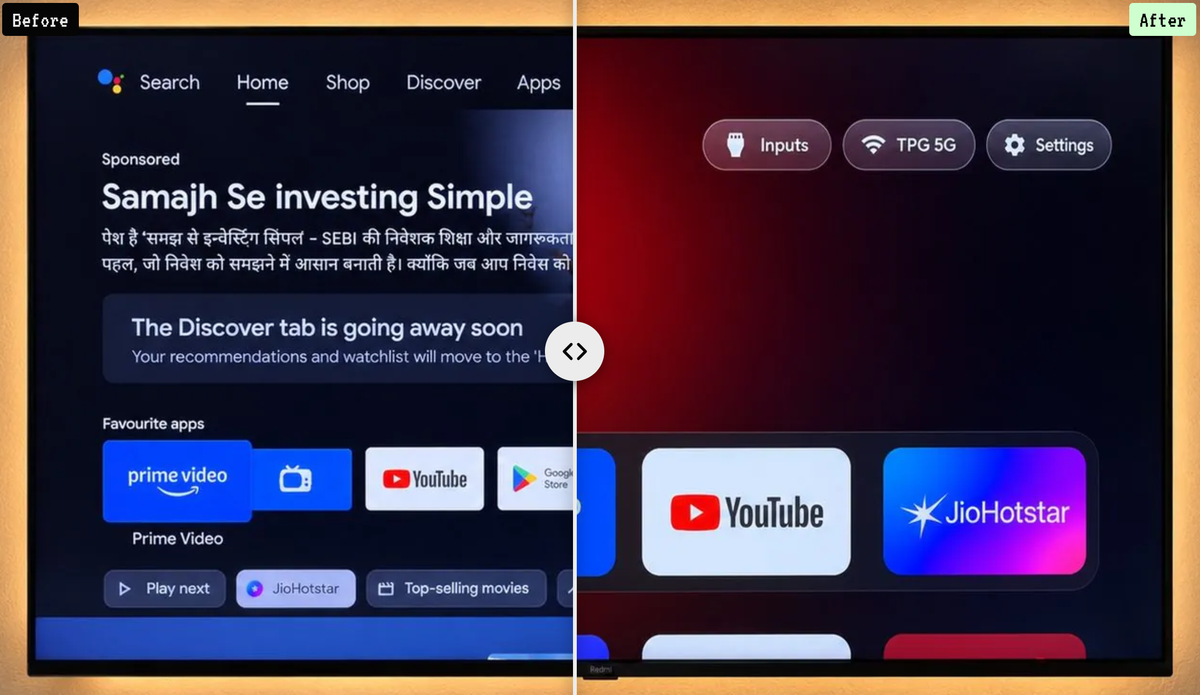
I've owned my Xiaomi Mi Box for years. I don't remember whether it was always there, but at some point a Google row I remember as "Recently Added" appeared on the home screen.
Most of the screen could be customised. I could move rows up or down or remove them. This one sat right in the middle, and I couldn't get rid of it.
I never use it. Never.
What made it worse was that my young child sometimes uses the TV. She wants to open Jellyfin or YouTube, but she has to scroll past this row too. Sometimes it shows horror films. That really frustrated me.
I've flashed phones and routers before, so naturally I looked into flashing the box entirely. I didn't find anything suitable. As far as I could tell, the thing annoying me was part of Android TV itself.
A repo I happened to find
Recently, popular GitHub projects have been appearing all over my social feeds. One of them was CleanYourTV.
It looked worth a try. I asked Codex to review the code and check whether it would work with my box. That gave me enough confidence to proceed.
First we had to establish which box I actually owned. It turned out to be a first-generation Mi Box S, running Android TV 9. The project already had an example for that model and firmware. Brilliant!
I enabled Developer options and USB debugging on the TV, accepted the debugging connection, and we worked from the PC over Wi-Fi. I used the remote when something needed confirming on the screen.
I didn't end up flashing a new operating system. We installed a replacement launcher and disabled selected packages instead.
Keep the things I actually use
I wanted four apps at the front: Jellyfin, YouTube, VLC and NordVPN.
I also wanted to keep Chromecast, voice search, the phone remote, firmware updates and my photo screensaver. Applying the entire example debloat list would have disabled some things I wanted, so we used smaller lists based on those choices.
Before changing anything, we saved the package lists, settings and screenshots, along with recovery information. Packages were disabled rather than uninstalled.
Codex handled the build tools and compiled the launcher with my app choices. We disabled 14 packages, including unused apps and selected recommendation and tracking components. After installing the launcher, we rebooted. The clean home screen came back, the four apps opened, and the packages stayed disabled.
That was what I wanted. My apps at the front, without the forced row in the middle.
A couple of weeks later
I wouldn't go back. The experience is 99% there, but I do have two criticisms.
The Home button on my original Xiaomi remote no longer takes me back to the main menu. It used to work regardless of where I was. Now I have to press Back all the way out. I haven't worked out why yet.
The other one appeared after a reboot. The screen dimmed and a promotion dropped down in the top-right corner for what looked like an Italian RAI TV offering. I hadn't seen it since the cleanup, so I'd assumed it was gone too. Apparently not. If it happens again, I'll photograph it and revisit the repo, perhaps checking for updates.
So I can't call the box completely ad-free. I've left USB debugging enabled too.
Still, the home screen is clean and the row that annoyed me is gone. It was a pet peeve I finally got around to fixing. I'm glad I did.